
Humanize AI drafts
into natural writing.
TextPulse rewrites AI-assisted drafts into natural, human-like text in your own voice. Your meaning, key terms, citations, and academic tone are preserved, and you can export tracked changes to Word.
No credit card requiredCancel anytime


Trusted by researchers publishing in









What the humanizer fixes in AI drafts
AI drafts often repeat the same generic words in a flat, monotonous sentence rhythm. The humanizer rewrites them into natural, human writing style.
Repetitive phrasing
AI drafts repeat the same openings and linking words. The humanizer varies them, and your meaning is preserved.
Flat rhythm
When every sentence has the same length, the text sounds mechanical. The humanizer gives it a natural rhythm in the tone you pick.
Generic wording
AI vocabulary and word choices make writing sound robotic. The humanizer replaces them with wording humans actually use.
What the humanizer changes and what it preserves
The humanizer changes the wording and the rhythm of your sentences. Your meaning, key terms and citations are preserved.
Natural writing from AI drafts
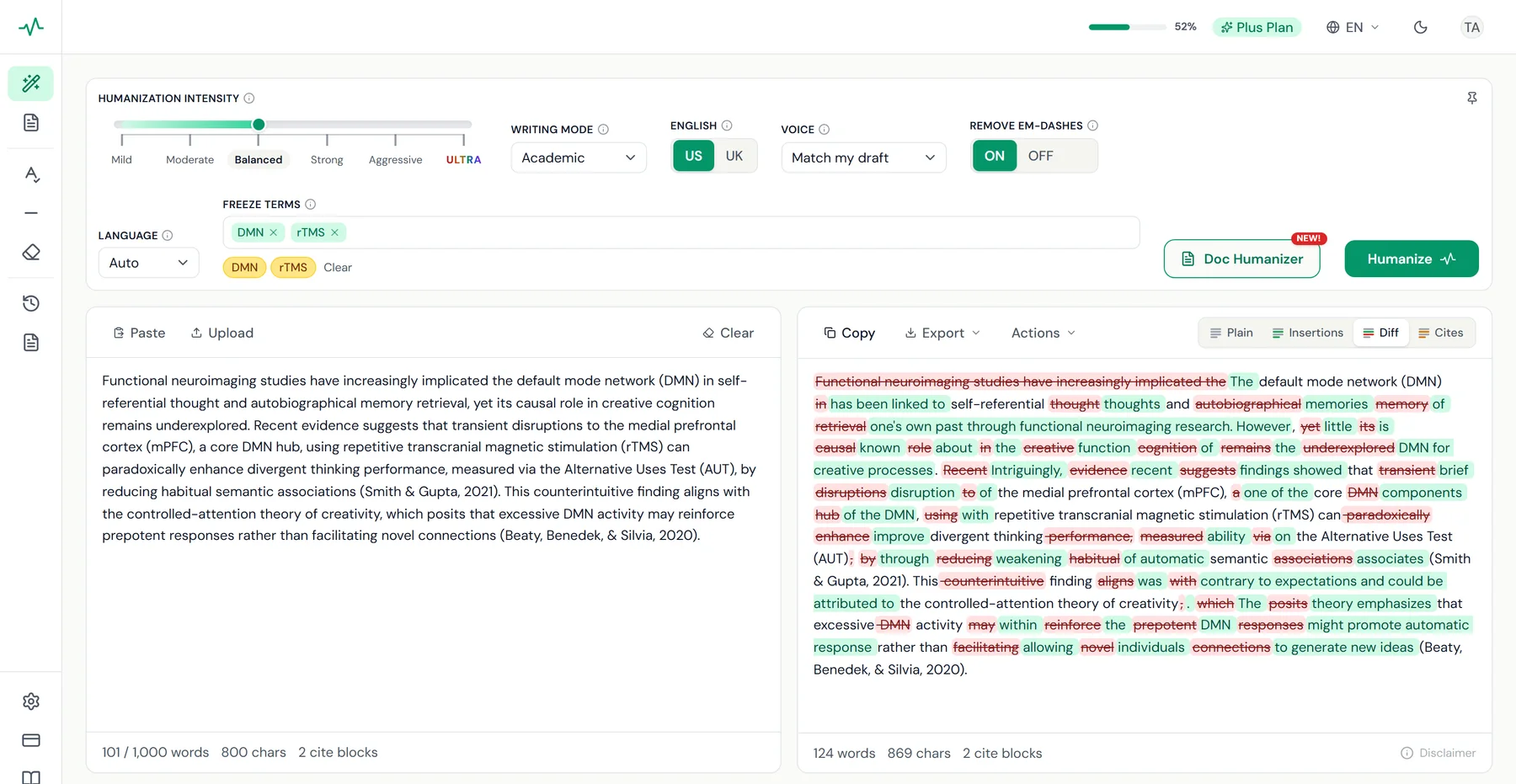
Flat, repetitive sentences are rewritten into clear text with a natural rhythm, in the tone of the writing mode you pick.
Meaning and key terms preserved
The humanizer changes the wording and your meaning is preserved. You can freeze the key terms and SEO keywords that must not change.
Every change shown
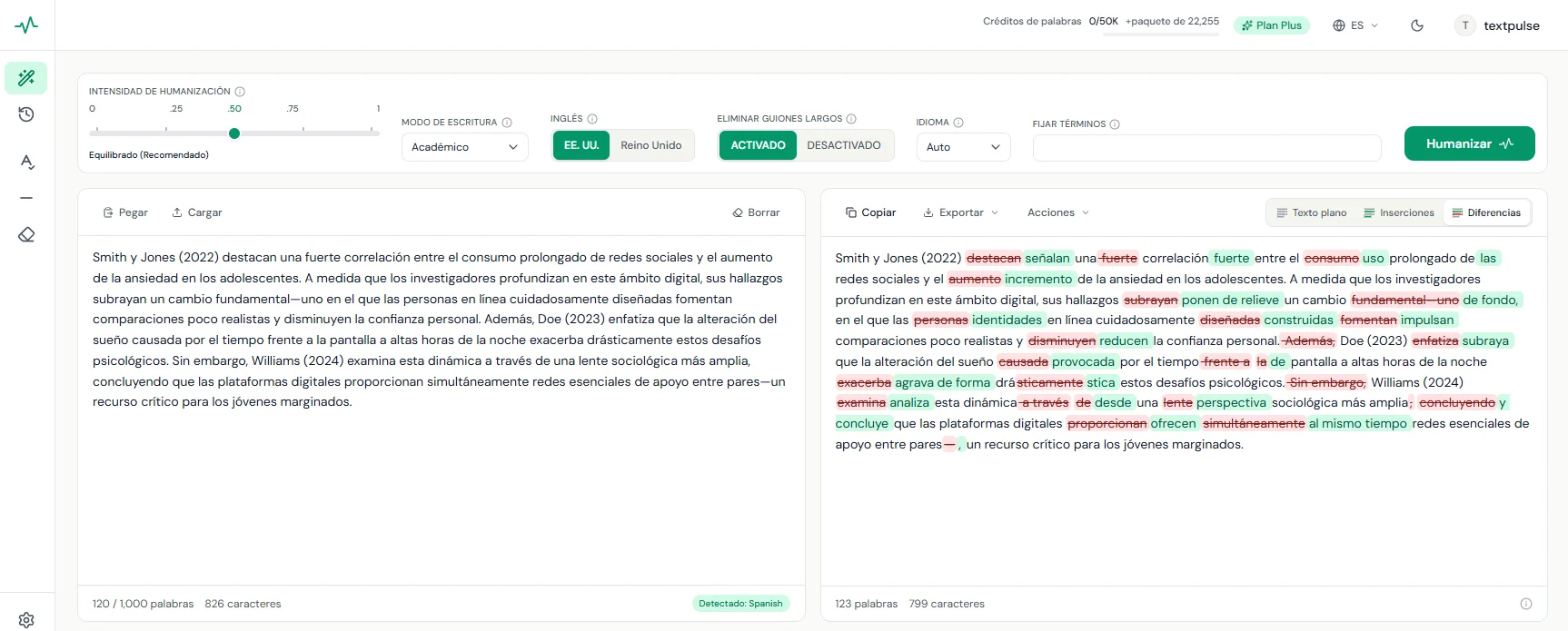
The tracked-changes view marks removed words in red and new words in green.
Your own voice
The Voice filter writes in first person, second person or a formal voice, or matches the voice of your draft.
ULTRANEW!
ULTRA, our deepest rewrite for drafts that need the most work
ULTRA is the highest setting on the humanization intensity slider. It rewrites the most, and your meaning, key terms and citations are preserved. ULTRA comes with the Plus plan.
The lightest rewrite, with the highest readability and grammar. A good fit for drafts that need a light polish.
A moderate rewrite. Readability and grammar come first.
The recommended starting point, with a good balance between rewrite depth and readability. Meaning, citations and figures are preserved.
A deeper rewrite, with good readability and grammar.
An extensive rewrite, with acceptable readability and grammar.
The deepest rewrite, for drafts that need the most work, with slightly lower readability and grammar. Revise the output before you use it.
Sixth setting
The final point in the slider
ULTRA is the top intensity setting and the deepest rewrite, on an advanced fine-tuned model of its own.
Preserved
Meaning and key terms
Citations, key terms and your freeze terms are preserved at ULTRA, as at every other setting.
Doc Humanizer
Whole documents too
ULTRA works in the humanizer and in the Doc Humanizer, for Word files of up to 15,000 words.
Before you publish
Revise the output
ULTRA rewrites the most, so readability and grammar are slightly lower. Check the output in the tracked-changes view and revise it before you use it.
Doc HumanizerNEW!
Humanize a whole Word document in one shot
Upload a Word document of up to 15,000 words and download it humanized, with the headings, tables, figures, equations and references preserved. The body paragraphs are humanized with your humanizer settings, ULTRA included.

Humanizing section 8 of 1264%
You get an email when the document is ready.
One upload of up to 15,000 words
Upload the .docx and every body paragraph is humanized in order, section by section, until the whole document is processed.
Formatting and structure preserved
Headings, lists, tables, captions, equations, footnotes and the reference list are preserved. Inline citations and hyperlinks are preserved inside the humanized paragraphs.
Clean copy or tracked changes
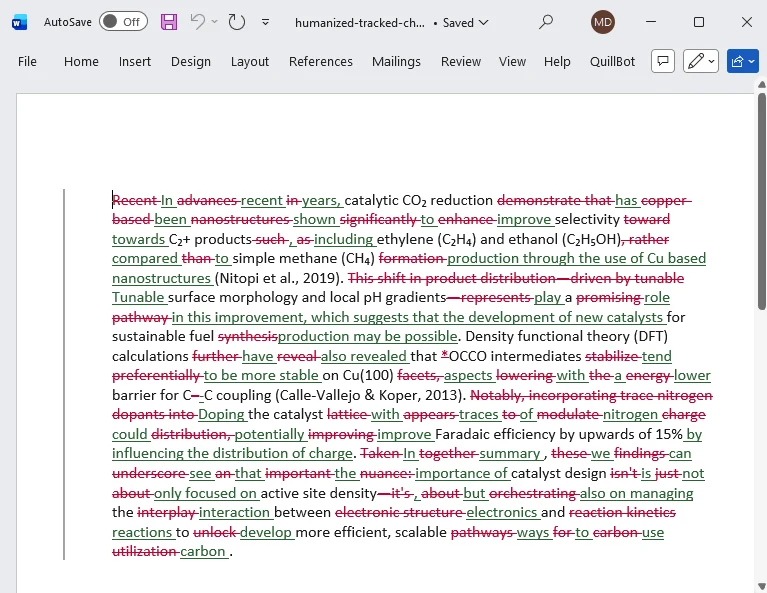
Download a clean Word file, or a Word file with every change tracked, so you can accept or reject each one.
Progress window and an email
Follow the progress in a window, or leave the page. You get an email when the document is ready to download.
Humanize in 60+ languages
The humanizer detects the language of your text and rewrites it in that language. For English text you can choose US or UK spelling. The multilingual humanizer comes with the Plus plan.
East Asia
Southeast Asia
South and Central Asia
Middle East and Caucasus
Africa
Europe
Paste, humanize, copy
- 1
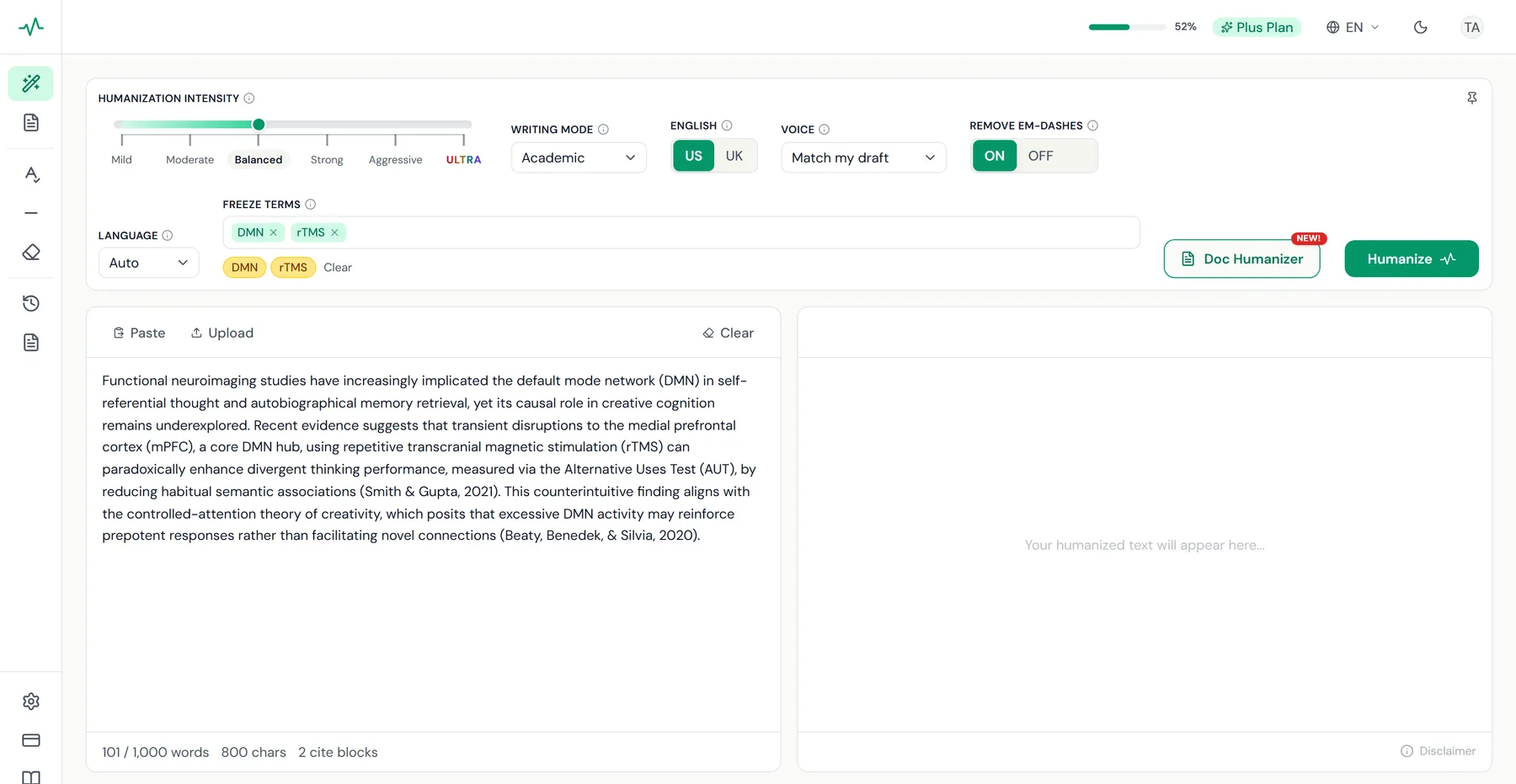
Paste your draft. Paste text or upload a file.
- 2
Pick a writing mode and press Humanize. Pro works in Academic mode. Plus has five modes and six intensity levels, up to ULTRA.
- 3
Review the changes, then copy or export. Check each edit in the tracked-changes view, then copy the text. Plus exports to Word with tracked changes.
Export tracked changes to Microsoft Word

Download your humanized text as a Word file with every insertion and deletion as a native tracked change. Accept or reject each edit in Word, or send the file to a colleague for review.
Who can use the humanizer?
From researchers to content marketers, every writer gets a writing mode built for the job.
Researchers and academics
PhD candidates, postdocs and professors humanize AI-assisted drafts with their citations, methods and field terminology preserved.
University and college students
Polish AI-assisted coursework, essays and lab reports into clear, natural writing in your own voice.
Content writers and marketers
Humanize AI blog posts, SEO articles and social media content in your brand voice, with your SEO keywords preserved.
ESL writers
Non-native English speakers turn AI-assisted translations and drafts into natural English for journals, publications and business writing.
Corporate professionals
Business teams refine AI-drafted reports, proposals and internal documents in a professional tone that fits the brand.
Authors and novelists
Fiction and nonfiction writers polish AI-assisted prose in their own voice and prepare chapters for the manuscript.
Trusted by 84,000+ researchers
Academics from 200+ universities rely on TextPulse for publication-ready humanization.
As a non native English speaker I rely on AI to help draft my papers. This app preserves all technical terms while making the writing sounds natural for the same.
Review per their request. The freeze terms feature was the best part for me. I locked all my chemistry nomenclature and this tool has worked around them without even touching them. Five stars for that.
Good job. The humanizer tool is useful. I can see what changed and refine what I need.
Trusted by academics at leading universities

























Declare your AI use with a ready statement
TextPulse stands for responsible use of AI in writing. The Declare AI Use button gives you a ready statement and a citation for TextPulse in APA, MLA, Chicago, Harvard or IEEE style. Many publishers and employers ask writers to state how they used AI.
Declare AI Use
During the preparation of this work, the author(s) used TextPulse (https://textpulse.ai) to refine the language, style, and grammar of the text. The author(s) reviewed and edited all output and take full responsibility for the content of this work.
Cite TextPulse
TextPulse. (2026). TextPulse [AI text refinement software]. https://textpulse.ai
Plans for the humanizer
A free account gives you a demo. To humanize your own text, pick a plan.
Pro
$19 /month
or US$169 a year
- 25,000 words per month
- 500 words per humanization
- Academic writing mode
- Balanced humanization intensity
- Citation preservation
- Tracked-changes view
- Last 3 humanizations saved
Plus
$29 /month
or US$259 a year
- 50,000 words per month
- 1,000 words per humanization
- Doc Humanizer for .docx up to 15,000 wordsNEW!
- All writing modes and 6 intensity levels, from Mild to ULTRA
- Multilingual humanizer (60+ languages)
- 1st, 2nd and 3rd person voice filter
- Freeze terms and SEO keywords
- US/UK English control
- Tracked changes: view and export to Word
- Last 20 humanizations saved
Annual plans save 26%. Cancel anytime with no commitment.
Questions before you start
What does the humanizer change?
It changes the wording and the sentence rhythm. Flat, repetitive sentences are rewritten into natural text, and your meaning, key terms and citations are preserved. You see every edit in the tracked-changes view.
What is ULTRA?
ULTRA is the sixth and highest intensity setting and our deepest rewrite, for drafts that need the most work. Readability and grammar are slightly lower than at the other settings, so revise the output before you use it. ULTRA comes with Plus.
What does a free account include?
A free account opens the humanizer with a worked before-and-after example. To humanize your own text you need a plan, from US$19 a month.
Which plan has the Blog/SEO and Corporate modes?
Plus, at US$29 a month. It has all five writing modes, namely General, Academic, Corporate, Creative and Blog/SEO. Pro, at US$19 a month, works in Academic mode.
Does it work in other languages?
Yes, with Plus. The multilingual humanizer works in 60+ languages, and for English text you can pick US or UK spelling.
Turn your next AI draft
into natural writing.
Create a free account and open the humanizer. Plans start at US$19 a month.
No credit card requiredCancel anytime